

A store directory that sits on the map
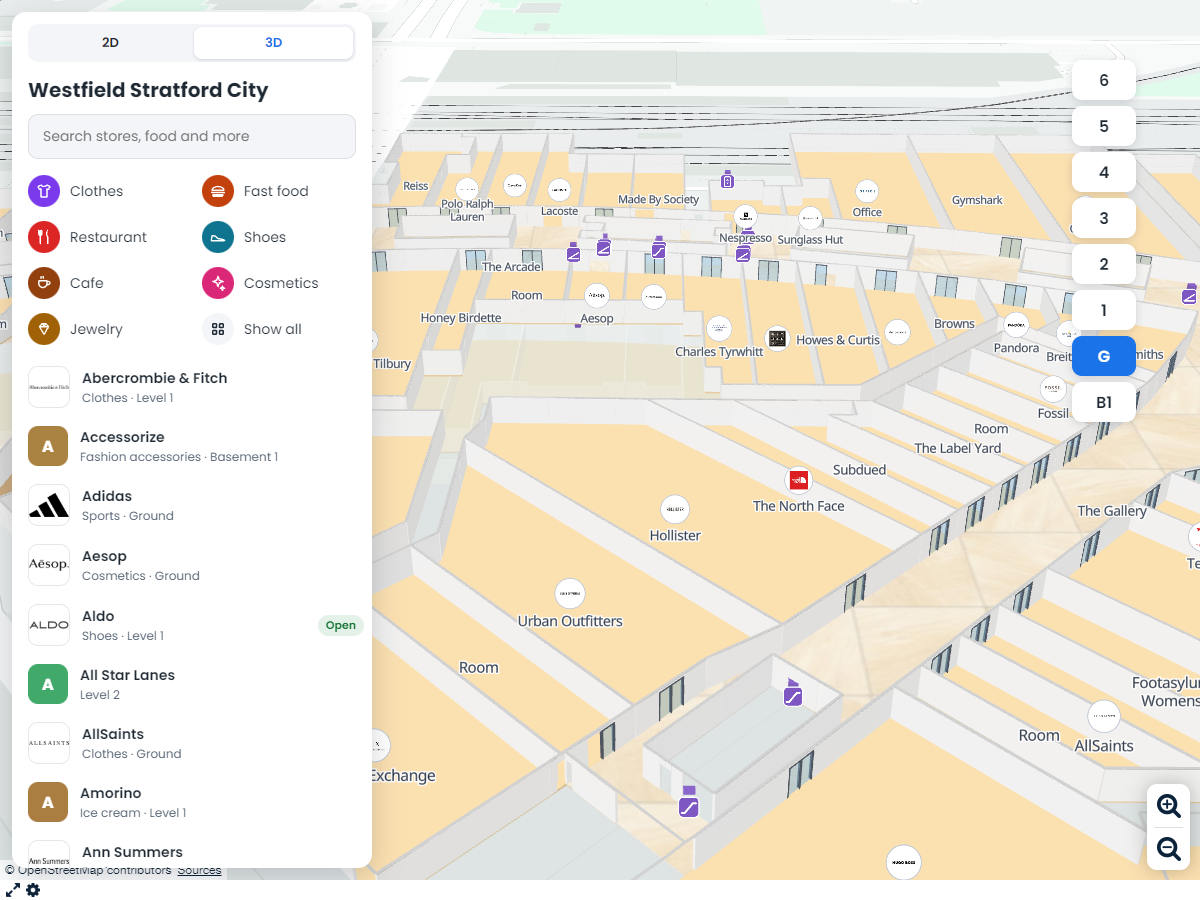
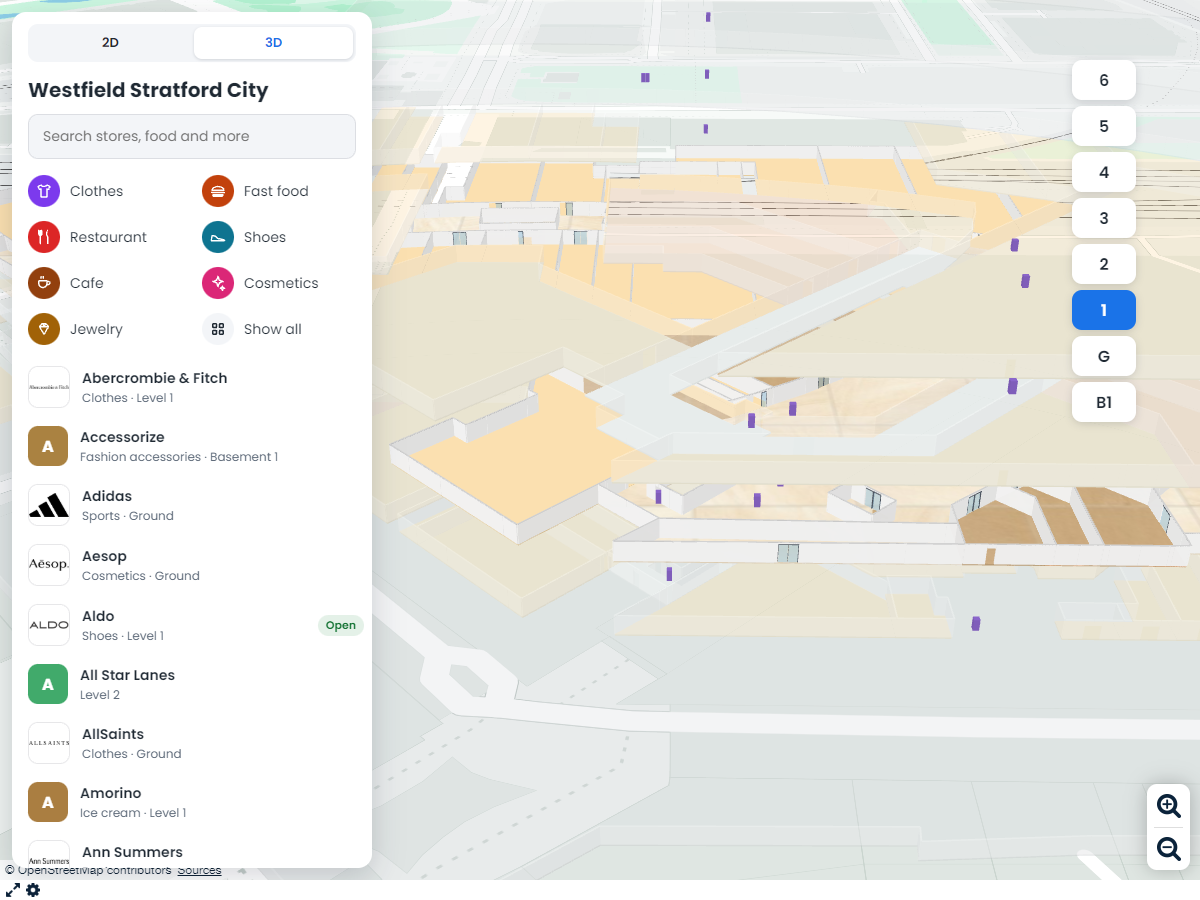
List every store with its logo, hours, website and phone. Visitors browse by category or search by name, and each store lights up on its floor. You can even show the store logos on the floor itself.

 English
 Español
 Français
 Deutsch
 Português
 日本語
 中文
 العربية
 한국어
 Italiano
 Русский
 Türkçe
 Nederlands
 Polski
 हिन्दी
 Dansk
 Čeština
 Română
 Ελληνικά
 Tiếng Việt
 Suomi
 Українська
 Indonesia
 Svenska
 Norsk bokmål
 Hrvatski
 Magyar
 Български
 中文(繁體)
 Slovenčina
 Srpski
 ไทย
 Eesti
 Català
 Lietuvių
 עברית
 Slovenščina
 فارسی
 Latviešu
 Azərbaycan
 Беларуская
 Melayu
 Bosanski
 ქართული
 Shqip
 Gaeilge
 Монгол
 ဗမာ
 O‘zbek
 اُردو
 Македонски
 ខ្មែរ
 Nynorsk
 বাংলা
 Galego
 Euskara
 Íslenska
 தமிழ்
 ລາວ
 ગુજરાતી
 Latina
 मराठी
 Қазақ тілі
 ਪੰਜਾਬੀ
 Afrikaans
 नेपाली
 አማርኛ
 తెలుగు
 ChiShona
 Cymraeg
 Føroyskt
 অসমীয়া
 Brezhoneg
 Esperanto
 Basa Jawa
 کٲشُر
 Ирон
 Sardu
 සිංහල
 Татар
 ትግርኛ
 Türkmen dili
 Malti
 ಕನ್ನಡ
 Lëtzebuergesch
 Te reo Māori
 Davvisámegiella
 ꆈꌠꁱꂷ
Draw or import every floor of your building, add your stores and rooms, and share a 3D map with a searchable directory and step-by-step directions across floors. It all runs in the browser, on any phone.
 4.7 / 5 · 200 reviews on G2
★ ★ ★ ★ ★“What I appreciate most about Scribble Maps is its intuitive interface and versatility. It enables me to easily draw, label, and personalize maps without needing advanced GIS expertise.”
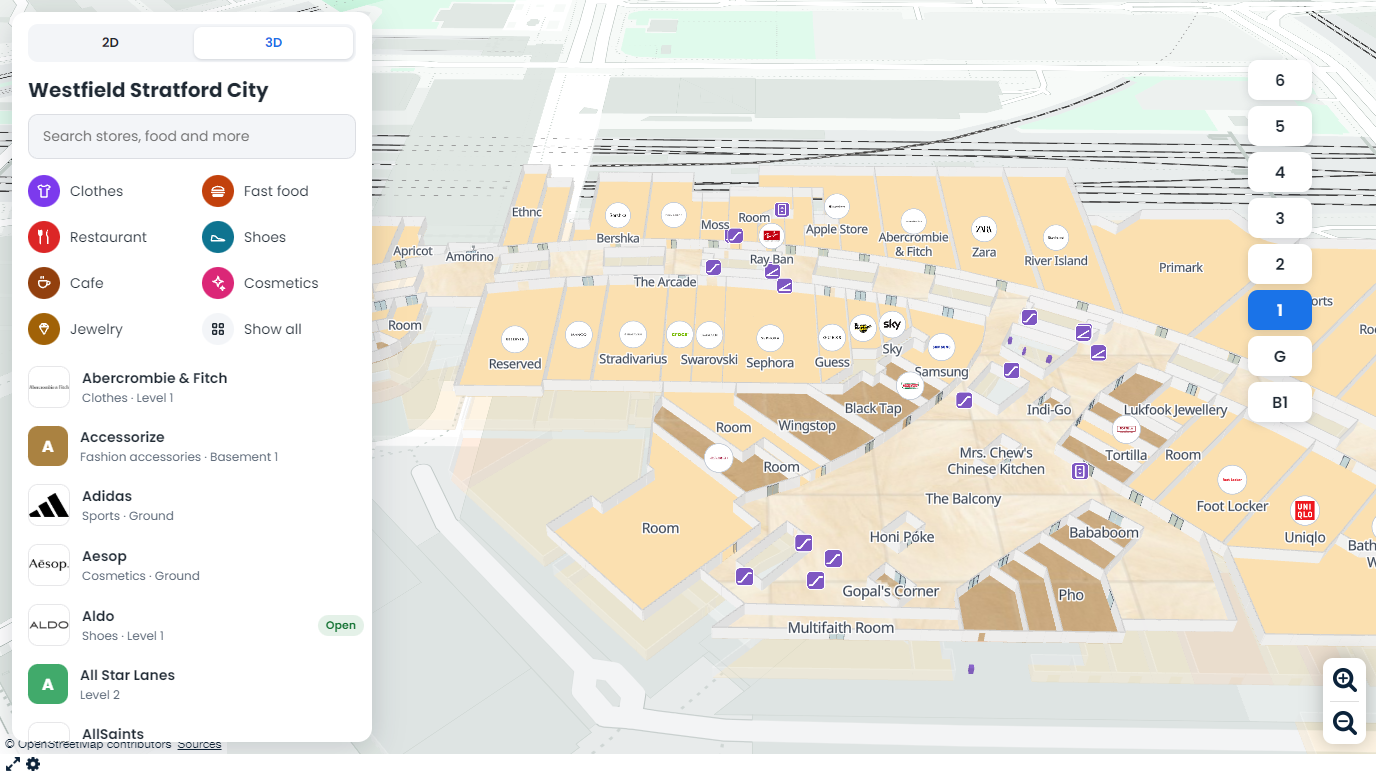
This is a real Scribble Maps indoor map of Westfield Stratford City in London. Search for a store, pick a floor, get directions between floors, and switch to 3D.
Map data from OpenStreetMap contributors. Your own venue looks like this when you share or embed it.
Draw rooms and halls with the same tools you use for any Scribble Maps map, or import an indoor OpenStreetMap file. Tag each shape as a store, a hall, stairs or an elevator. No mapping team and no wait for a vendor.
Visitors pick where they are and where they want to go. They get the whole route first, then clear steps with the escalators, elevators and floor changes on the way. Step-free routes skip stairs and escalators.
Send a link, embed it on your website, or put it on a screen. The map, the directory and the directions all run in the visitor's browser, so there is no app to install.
List every store with its logo, hours, website and phone. Visitors browse by category or search by name, and each store lights up on its floor. You can even show the store logos on the floor itself.
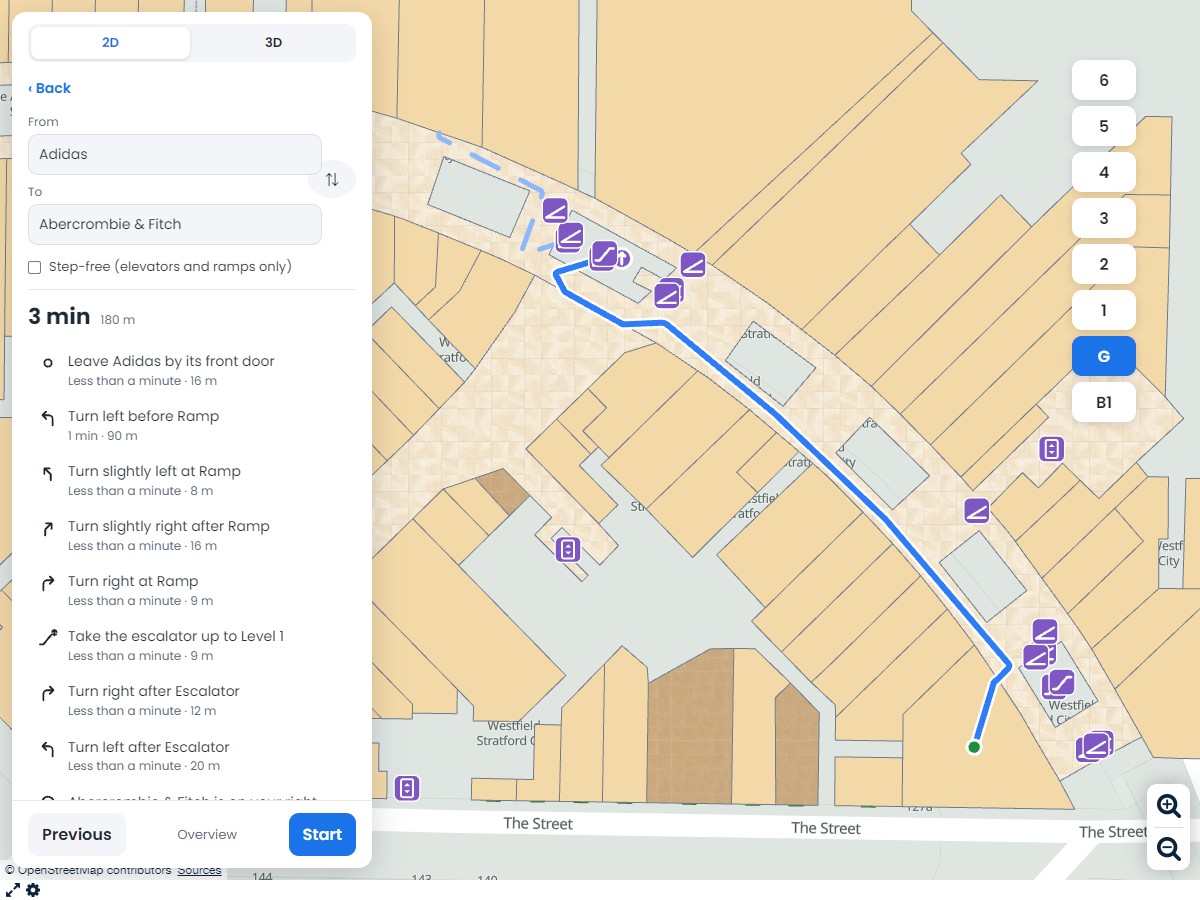
Pick a start and a store. The map shows the whole route from above, with arrows where it goes up or down a floor. Press Start and it walks you through each step, from the escalator to the store door.
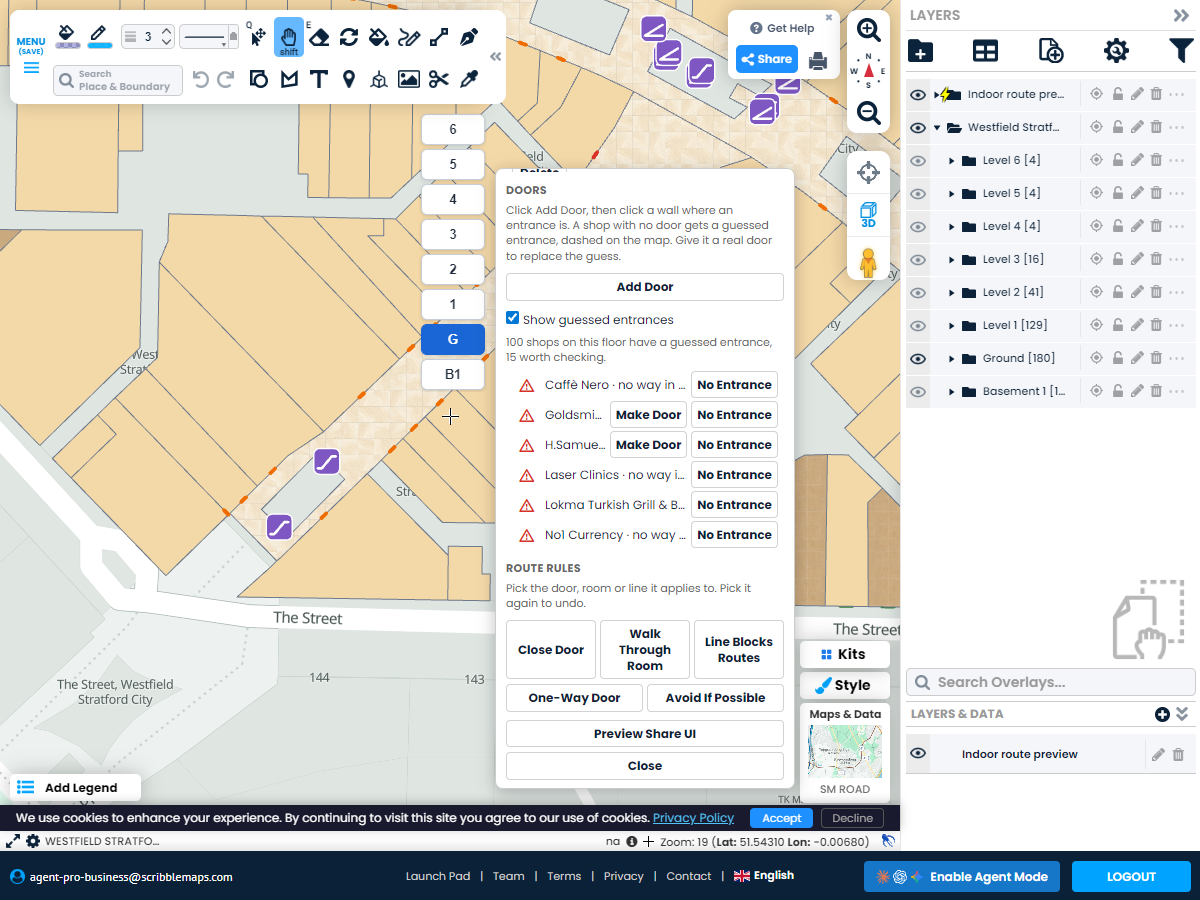
Mark doors that only open one way, close a hall for an event, or tell the router to avoid an area when it can. Step-free routes use elevators and ramps. Changes show up in the next route right away.
Stack the floors with extra space between them and lines that join them, or look at one floor at a time. Choose glass or solid doors, set floor colors and textures, and turn the view to match your building.
Scribble AI
Tell Scribble AI what you need. Try “draw a 500m buffer around every site,” “import this CSV and color by status,” or “measure the route from the depot to each stop.” It does it in seconds. No GIS training needed, and your team gets the same map, ready to share.
Try Scribble AI →Scribble Maps next to four other indoor wayfinding tools, based on what each company shows on its own website.
| Scribble Maps | MapsPeople | Pointr | Mapsted | 22 Miles | |
|---|---|---|---|---|---|
| Price on the website | $100 / month Pro Business, $90 billed yearly | Contact sales | Contact sales | Contact sales | Contact sales Priced per building and floor |
| Build and edit the map yourself | Yes Draw or import in the browser | Partly Upload new floor plans | Not published | Partly Mapsted builds the map | Partly 22 Miles builds the map |
| Directions across floors | Yes | Yes | Yes | Yes | Not published |
| Step-free routes | Yes | Yes | Yes | Yes | Not published |
| Close areas or set one-way doors yourself | Yes Closed, one-way and avoid areas | Partly Block areas by user role | Not published | Partly Close places such as elevators | Partly Close routes for construction |
| Works in the browser with no app | Yes | Yes | Yes | Yes | Not published Phone hand-off by QR code |
| 3D view of stacked floors | Yes | Yes | Not published | Not published | Yes |
| Store directory with logos and hours | Yes | Yes | Yes | Yes | Not published |
| Shows where the visitor is (blue dot) | No Visitors pick their start | Not published | Yes Bluetooth beacons | Yes No beacons needed | Not published |
| AI floor plan import | No | Yes | Yes | Partly Mapsted converts your plans | Partly 22 Miles converts your plans |
| Kiosk mode | Partly | Yes | Yes | Yes | Yes |
| Visitor analytics | No | Not published | Yes | Yes | Yes |
| Indoor map, outdoor map and your other map layers in one tool | Yes | Not published | Not published | Not published | Not published |
Based on each company's public website on October 30, 2026. "Not published" means we could not find it there. Features change, so check with each company before you buy.
Pro Business
$100 per month
Open the Indoor Maps kit and create a venue. Add your floors, then draw the rooms and halls on each floor or import an indoor OpenStreetMap file. Tag each shape as a store, a hall, stairs, an escalator or an elevator, and add your stores to the directory. Share the map when it is ready.
Yes. Visitors choose a start and a place to go. The map shows the whole route first, with arrows where it goes up or down. Then they step through it one turn at a time. Routes use your stairs, escalators and elevators, and step-free routes use only elevators and ramps.
No. The indoor map runs in the browser on phones, tablets and computers. Share a link, embed the map on your website, or show it on a screen in the building.
Yes. Mark doors that only open one way, close an area, or mark an area to avoid if possible. The router then picks the best route that follows your rules.
Today you can import indoor OpenStreetMap data and draw over an image of your plan. Support for more floor plan files is on the way.
Visitors pick their start from the directory or by tapping the map. The indoor map does not use indoor positioning beacons, so there is no hardware to install.
Indoor Maps is part of Pro Business, at $100 a month or $90 a month billed yearly, with a free 7-day trial for eligible first-time subscribers.