 English
 Español
 Français
 Deutsch
 Português
 日本語
日本語
 中文
中文
 العربية
 한국어
한국어
 Italiano
 Русский
 Türkçe
 Nederlands
 Polski
 हिन्दी
 Dansk
Dansk
 Čeština
 Română
 Ελληνικά
 Tiếng Việt
 Suomi
Suomi


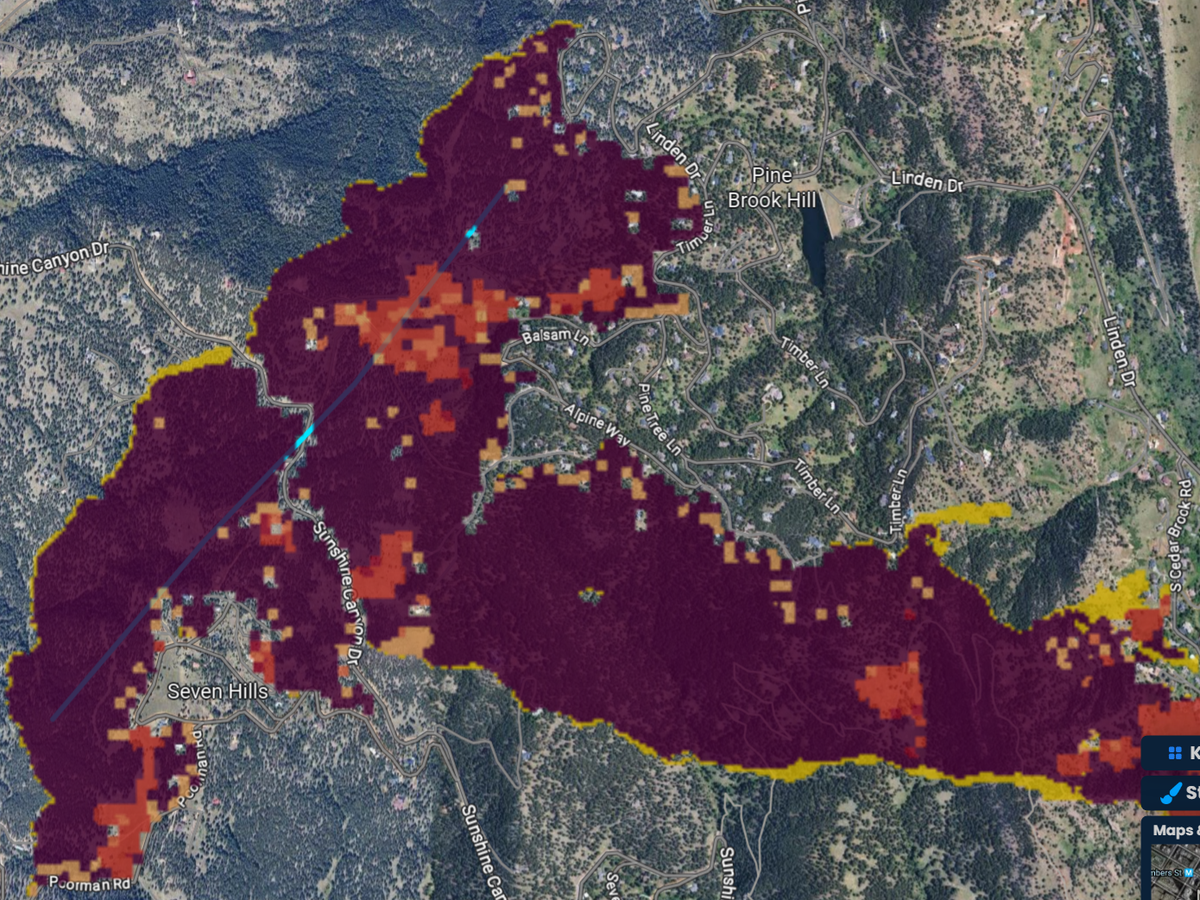
See where a power line fire would run
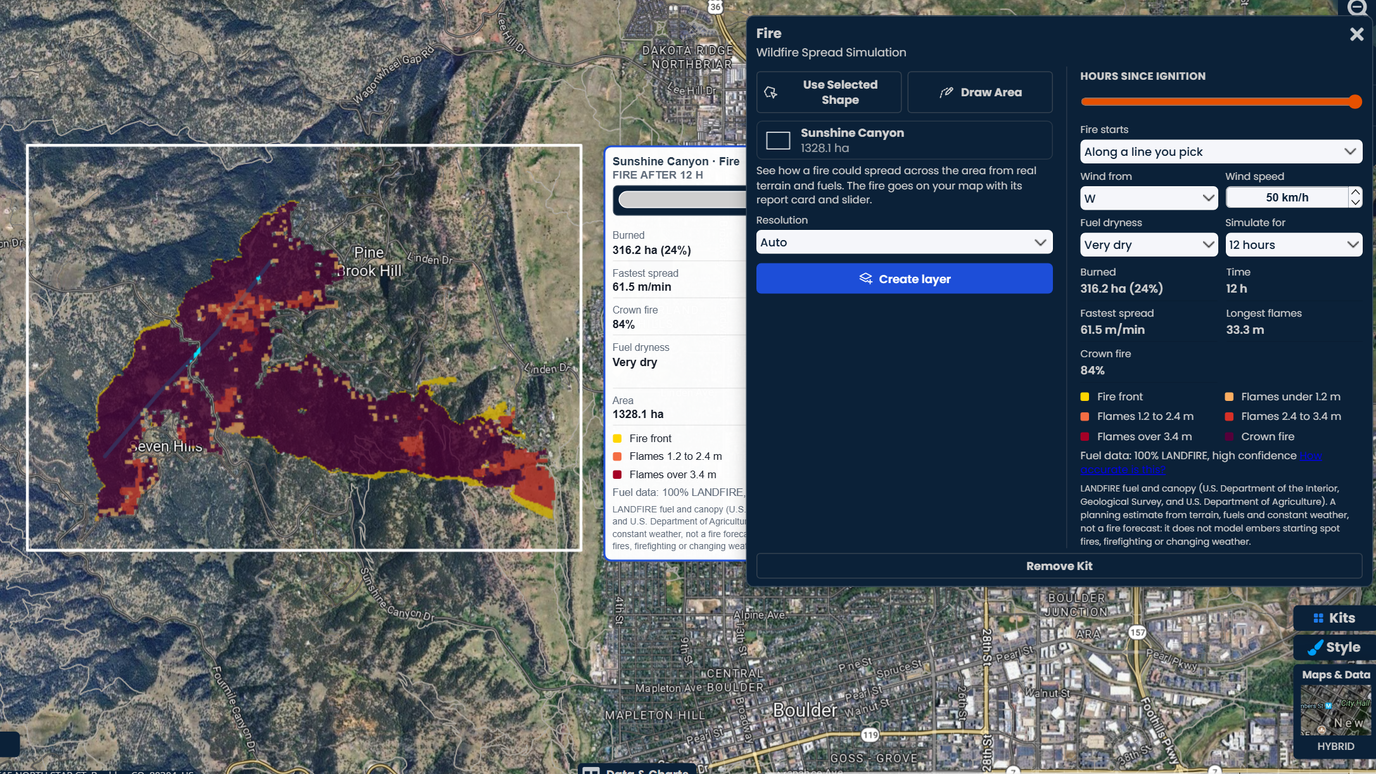
Pick a power line on your map as the start of the fire, set a strong, dry wind, and see which slopes and canyons it would burn through. Compare lines to decide where to clear vegetation first.

Draw an area, choose where a fire starts, set the wind and how dry it is, and watch the fire grow across real terrain and fuels. Drag the time slider to see where it reaches by each hour. Your first 3 runs are free.
 4.7 / 5 · 200 reviews on G2
★ ★ ★ ★ ★“What I appreciate most about Scribble Maps is its intuitive interface and versatility. It enables me to easily draw, label, and personalize maps without needing advanced GIS expertise.”
The fire burns across detailed terrain and each country's national fuel map: LANDFIRE in the US, Natural Resources Canada's fuel types in Canada. It runs faster uphill, through dry brush and into the trees, and stops at roads, rock and water.
Drag one slider from the first hour to the last and the fire grows across the map right away. Change the wind or the dryness and see a new fire in about a second.
Each run goes on your map with a report card: area burned, fastest spread, flame length and crown fire. Share it by link with your team, a client or the public. No GIS software needed.
Pick a power line on your map as the start of the fire, set a strong, dry wind, and see which slopes and canyons it would burn through. Compare lines to decide where to clear vegetation first.
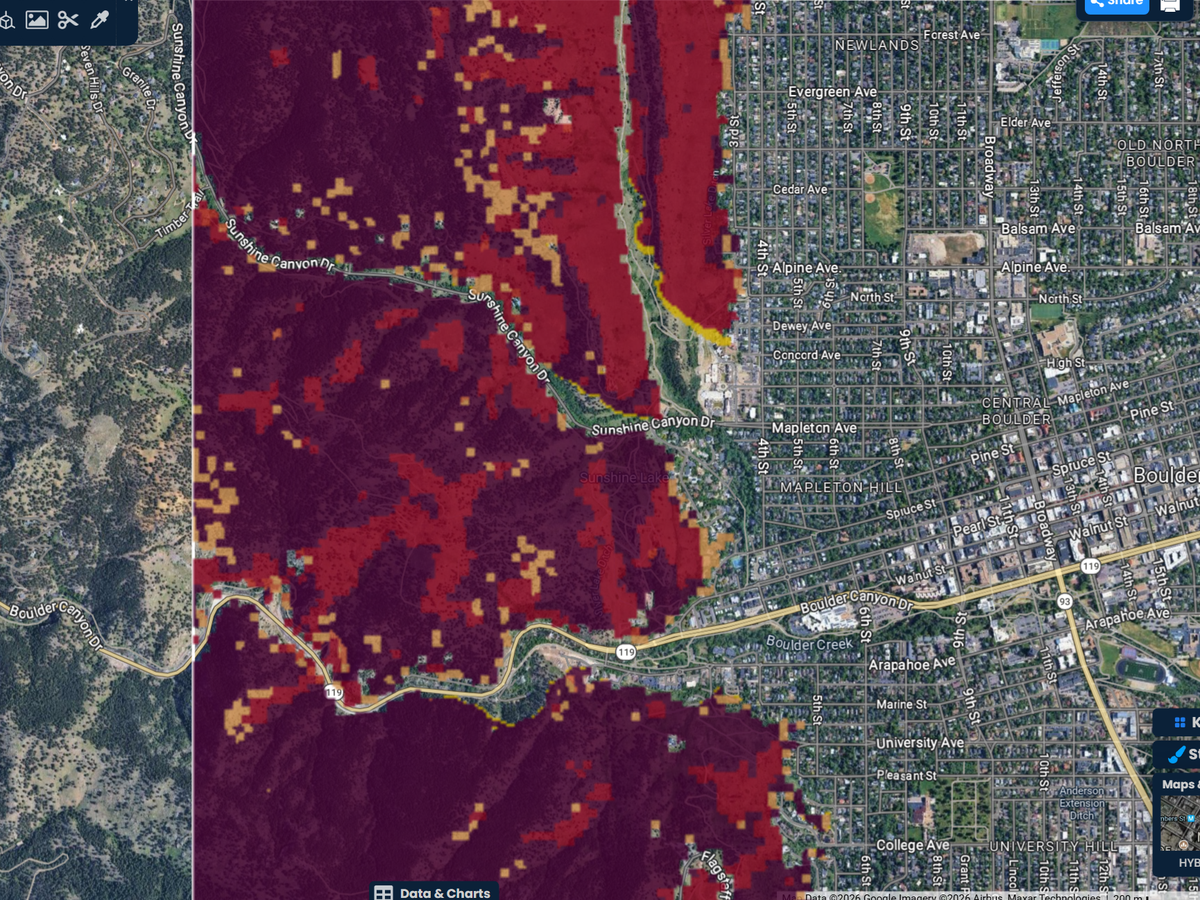
Let a fire come in across the upwind edge of an area, the way a wildfire in the hills moves toward town. See how far it runs, how fast, and where it reaches the first streets.
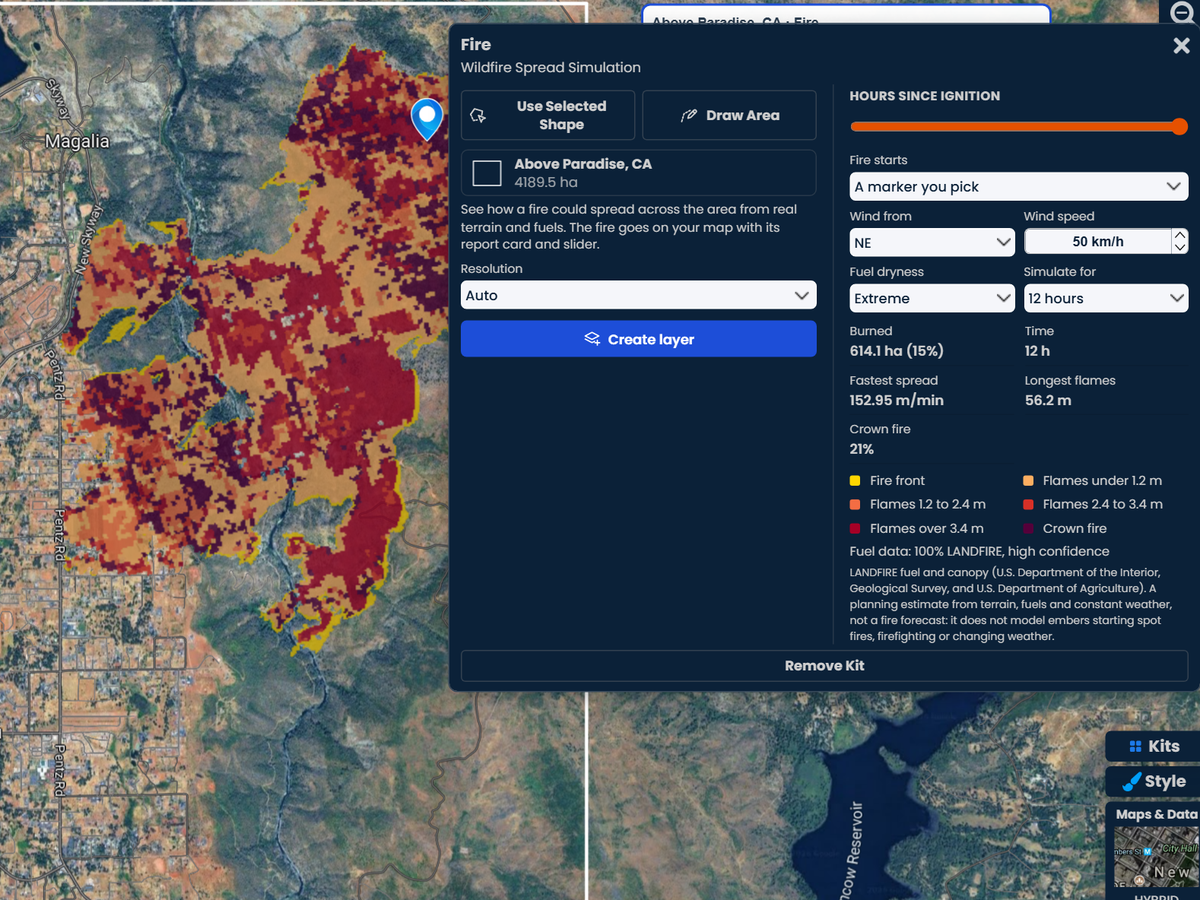
Run the same fire with fuels that are dry, very dry or extremely dry, or with a different wind. The burned area, spread rate and flame length change right away, so you can see how much the day matters.
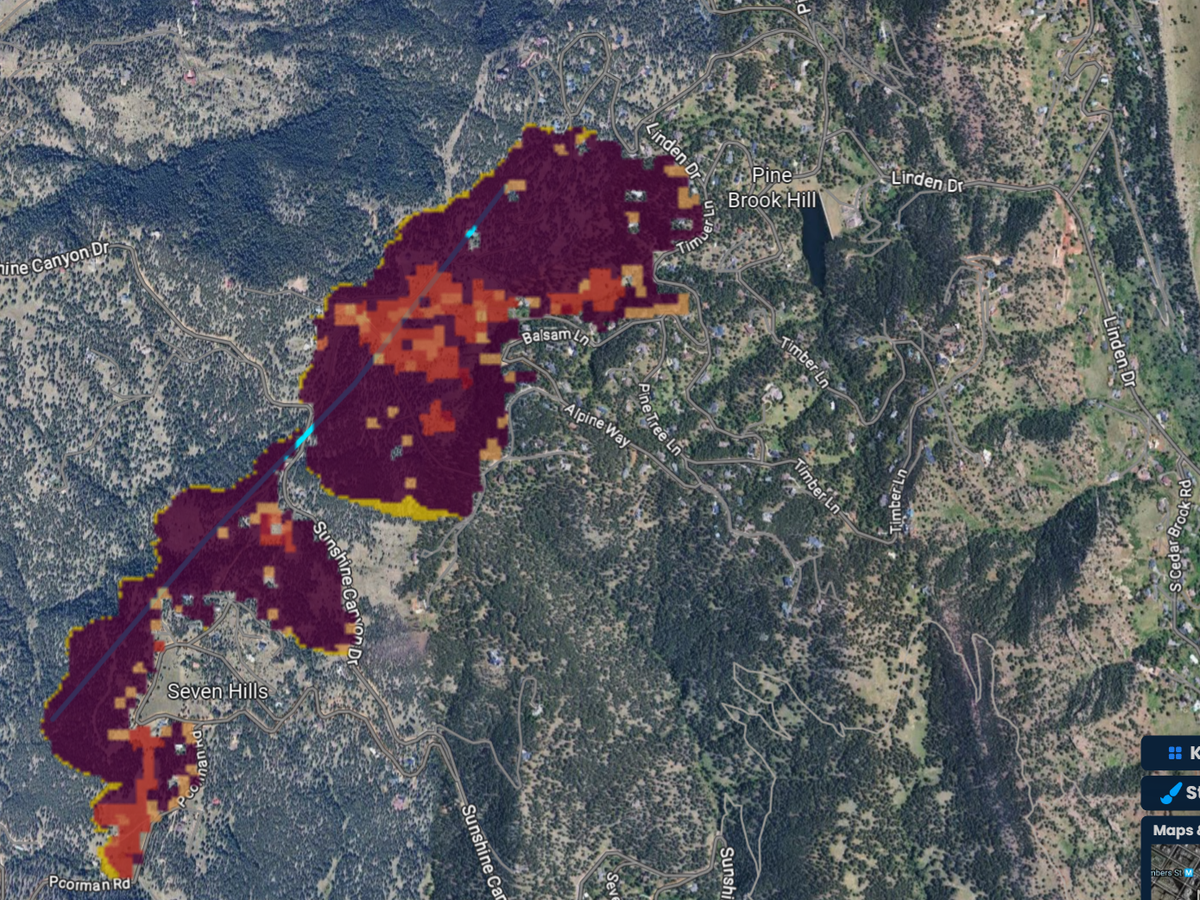
Drag the time slider to see where the fire is after 1 hour, 3 hours or 12. The fire front, the flame length and crown fire are colored on the map, and the report card follows the time.
Scribble AI
Tell Scribble AI what you need. Try “draw a 500m buffer around every site,” “import this CSV and color by status,” or “measure the route from the depot to each stop.” It does it in seconds. No GIS training needed, and your team gets the same map, ready to share.
Try Scribble AI →“When we started using Scribble Maps, it was super easy for our whole team to get on the same page and quickly start using it together. The support we’ve received from Scribble Maps has been amazing too. We know that if the sh*t is hitting the fan, they’re super quick to get back to us and help us understand how to solve any issues.”
Pro Business
$100 per month
Open the Fire kit, draw an area or pick one you already drew, and click Create layer. Choose where the fire starts, set the wind and how dry the fuels are, and drag the time slider to watch it spread.
In the US, fuels and tree canopy come from LANDFIRE, the national fuel map from the US Department of the Interior and the US Department of Agriculture. In Canada, they come from Natural Resources Canada's national fuel type map. Terrain is Scribble Maps elevation, from USGS 1 m lidar across most of the US. In the US, the wind starts from the National Weather Service forecast for your area.
It uses each country's standard fire behavior models: in the US the ones behind FlamMap and FARSITE, in Canada the Canadian Fire Behaviour Prediction System. We test them against independent implementations and published tables. It is a planning tool for comparing places and scenarios, not a forecast of a real fire. Our help article explains how we test it, the benchmarks we are adding, and what it leaves out. How accurate is the Fire kit?
Yes. In 2011 a wildfire burned 40% of the town of Slave Lake in Alberta, Canada. Lesser Slave Regional Fire Service now keeps a safety rating for every home on a shared Scribble Maps map: green for safe, yellow for problematic and red for unsafe. The whole crew sees the risks as soon as they get the call. Read the case study
No. It does not model embers that start new spot fires, firefighting or changing weather, so real fires can move faster. For an active fire, follow your local emergency services and official evacuation orders.
Yes. Draw or import the line, then choose Along a line you pick in the kit and pick it. The fire starts along the whole line. You can also start a fire at a marker or across the upwind edge of the area.
The United States and Canada. In the US the fire burns on LANDFIRE fuels with the US fire behavior models; in Canada on Natural Resources Canada's fuel types with Canada's own Fire Behaviour Prediction System. Areas can be up to 50,000 acres.
Every signed-in account gets 3 free fire runs. After that the Fire kit is part of Pro Business, at $100 a month or $90 a month billed yearly, with a free 7-day trial for eligible first-time subscribers.