

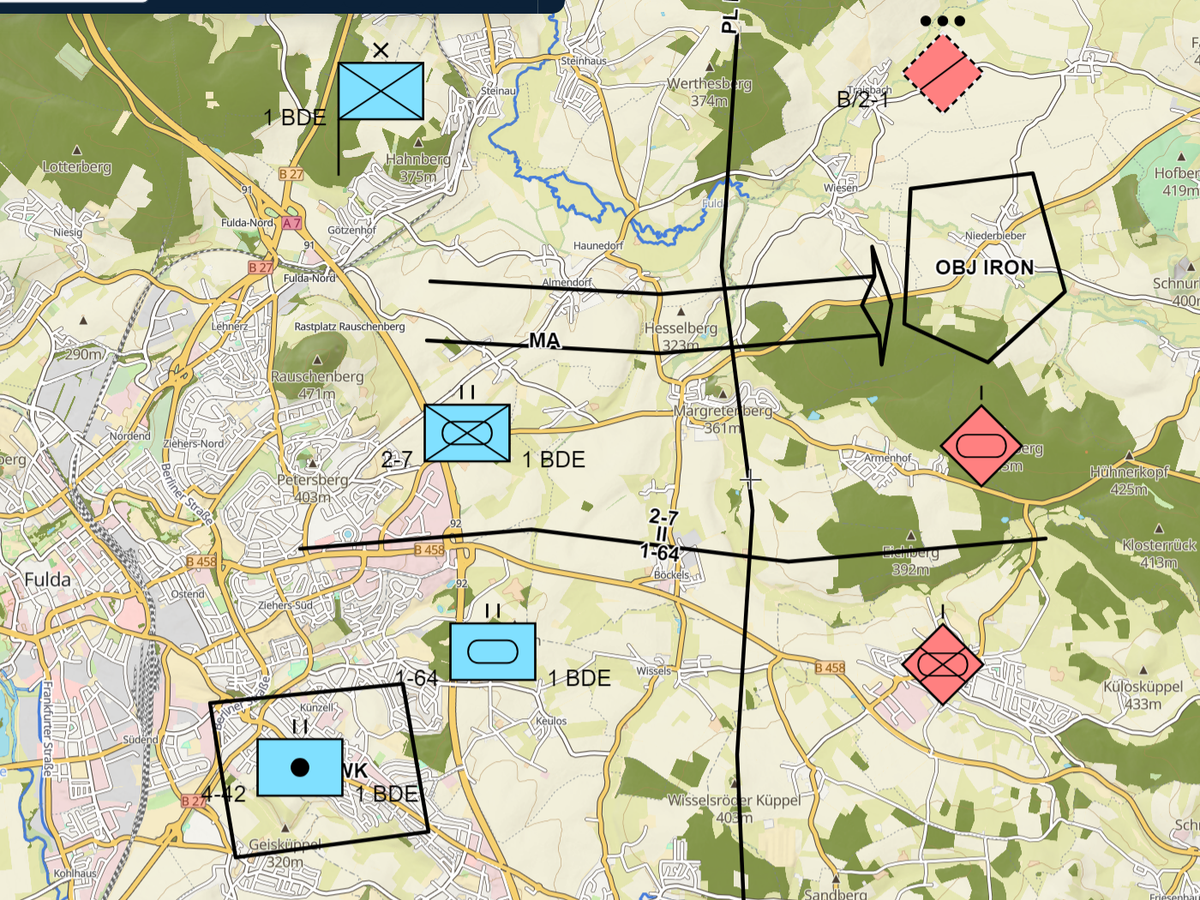
Build an operations overlay
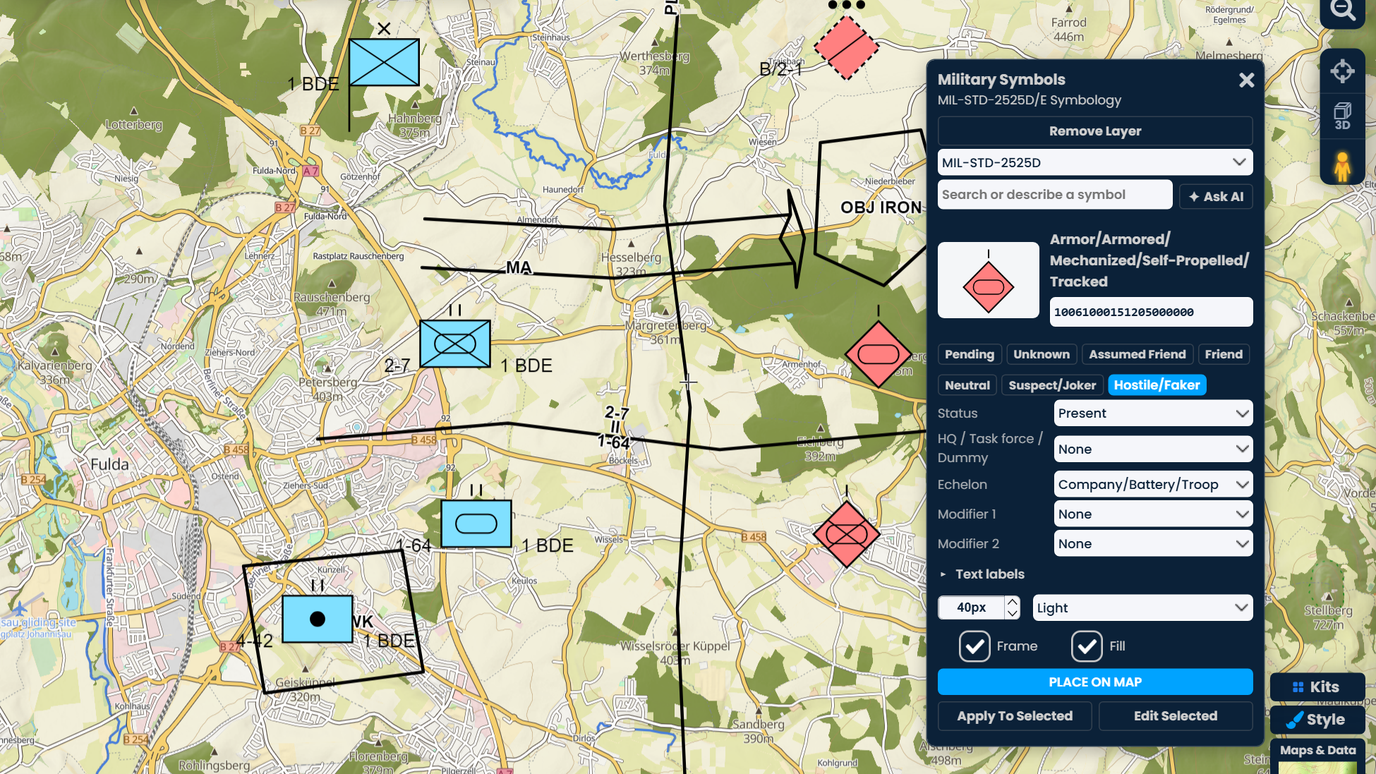
Draw the boundaries, phase lines, axis of advance and objectives, then place the friendly and enemy units. Every graphic redraws to fit as you zoom, so the overlay stays readable at any scale.

 English
 Español
 Français
 Deutsch
 Português
 日本語
 中文
 العربية
 한국어
 Italiano
 Русский
 Türkçe
 Nederlands
 Polski
 हिन्दी
 Dansk
 Čeština
 Română
 Ελληνικά
 Tiếng Việt
 Suomi
 Українська
 Indonesia
 Svenska
 Norsk bokmål
 Hrvatski
 Magyar
 Български
 中文(繁體)
 Slovenčina
 Srpski
 ไทย
 Eesti
 Català
 Lietuvių
 עברית
 Slovenščina
 فارسی
 Latviešu
 Azərbaycan
 Беларуская
 Melayu
 Bosanski
 ქართული
 Shqip
 Gaeilge
 Монгол
 ဗမာ
 O‘zbek
 اُردو
 Македонски
 ខ្មែរ
 Nynorsk
 বাংলা
 Galego
 Euskara
 Íslenska
 தமிழ்
 ລາວ
 ગુજરાતી
 Latina
 मराठी
 Қазақ тілі
 ਪੰਜਾਬੀ
 Afrikaans
 नेपाली
 አማርኛ
 తెలుగు
 ChiShona
 Cymraeg
 Føroyskt
 অসমীয়া
 Brezhoneg
 Esperanto
 Basa Jawa
 کٲشُر
 Ирон
 Sardu
 සිංහල
 Татар
 ትግርኛ
 Türkmen dili
 Malti
 ಕನ್ನಡ
 Lëtzebuergesch
 Te reo Māori
 Davvisámegiella
 ꆈꌠꁱꂷ
Search or describe any symbol, set its identity, echelon and labels, and place it. Draw boundaries, phase lines, axes of advance and objectives. Share the overlay by link. Your first 10 symbols are free.
 4.7 / 5 · 200 reviews on G2
★ ★ ★ ★ ★“Scribble Maps is one of the only software available that lets you make a fully customizable map.”
Every symbol follows MIL-STD-2525D or 2525E: the frame for its identity, the icon, echelon, modifiers, headquarters marks and text labels in the right places. Lines and areas get their teeth, arrowheads and labels.
Search thousands of symbols by name or code, or just describe what you need, such as "enemy tank company, planned". The AI search builds the full symbol for you to check and place.
Symbols and graphics are normal map items. Move them, edit them, put them in folders and share the map by link. Your team opens it in a browser on a laptop, tablet or phone.
Draw the boundaries, phase lines, axis of advance and objectives, then place the friendly and enemy units. Every graphic redraws to fit as you zoom, so the overlay stays readable at any scale.
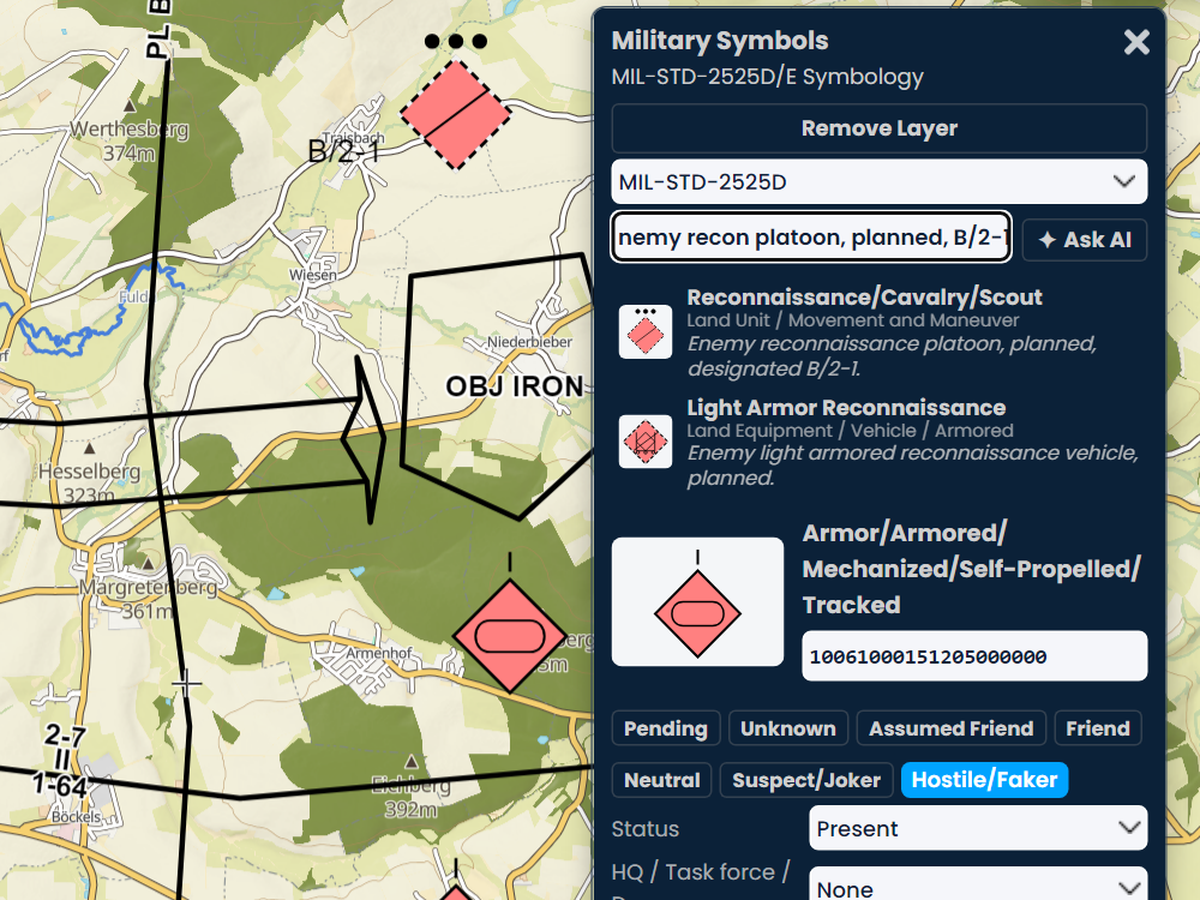
Type what you need in your own words, in any language. The AI lists up to five complete symbols with a short reason for each. Click one and the builder opens it with the identity, status, echelon and names already set.
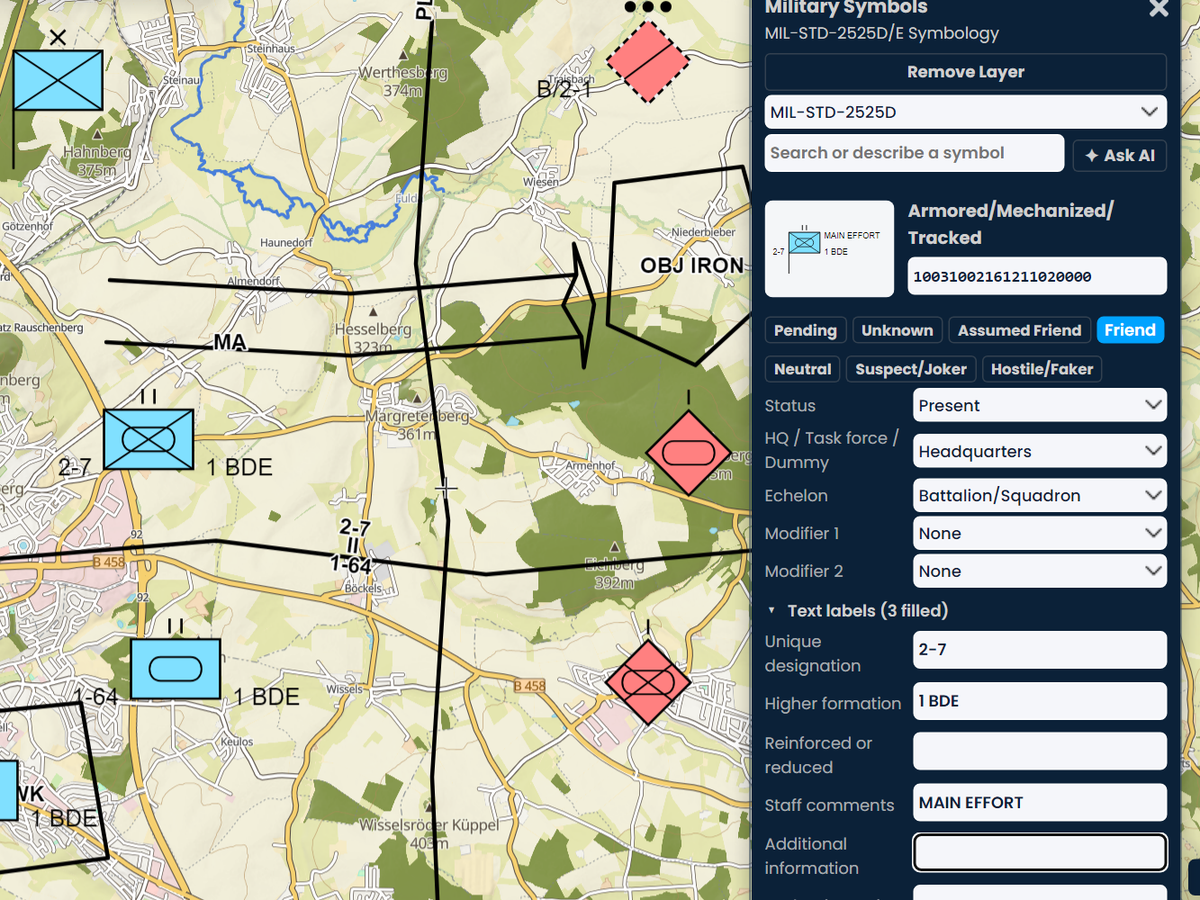
Pick the identity, status, headquarters, echelon or mobility and modifiers, and fill in labels such as the unique designation and higher formation. The preview and the 20-digit code update as you go.
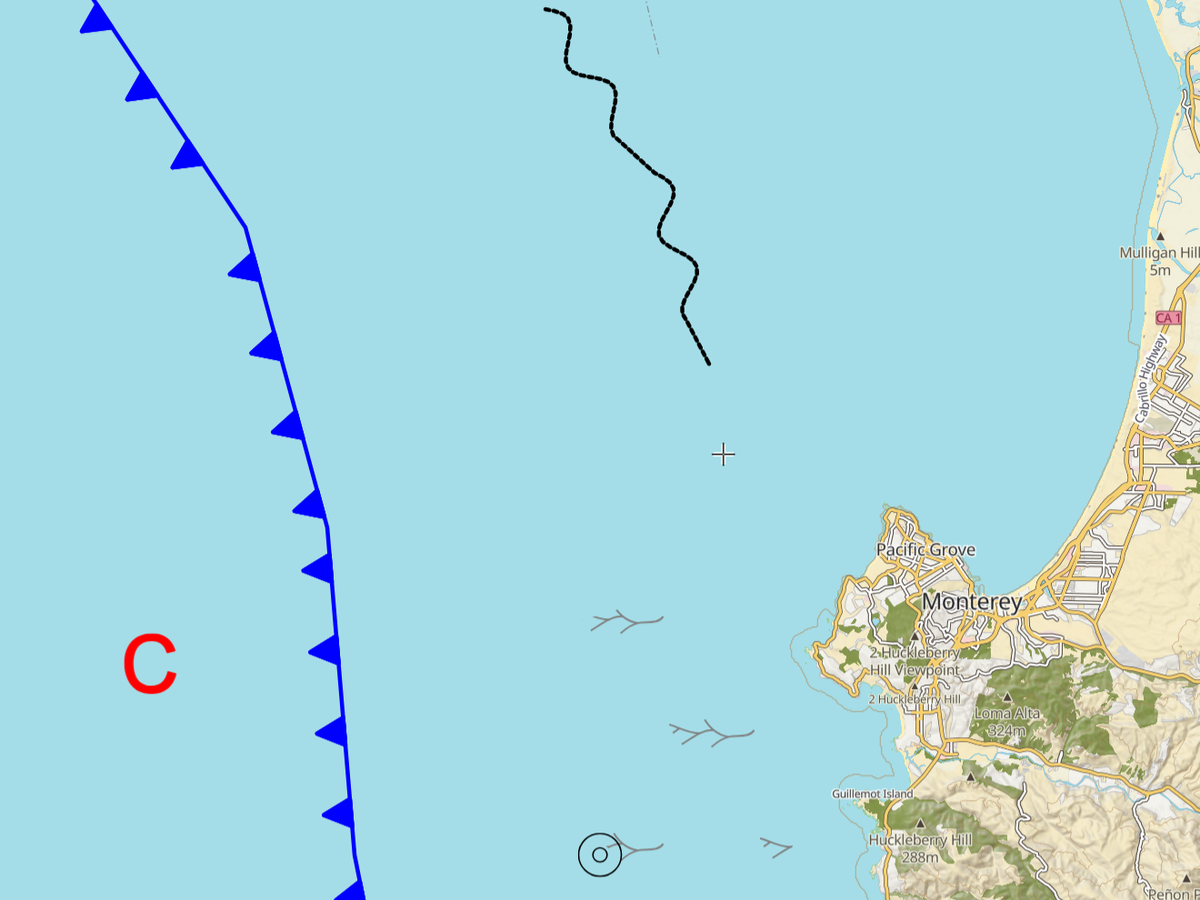
Add the standard's weather and ocean (METOC) symbols: pressure centers, fronts and trough lines, and ocean areas such as kelp with their fill patterns. Plan around the conditions on the same map.
Scribble AI
Tell Scribble AI what you need. Try “draw a 500m buffer around every site,” “import this CSV and color by status,” or “measure the route from the depot to each stop.” It does it in seconds. No GIS training needed, and your team gets the same map, ready to share.
Try Scribble AI →★ ★ ★ ★“Scribble Maps is one of the only software available that lets you make a fully customizable map. I was able to create unique markers for different types of sites for guests to easily find what they're looking for.”
Pro Business
$100 per month
Open the Military Symbols kit in Maps & Data. Search for a symbol or describe it, set its identity, echelon and labels in the builder, then click Place on map and click where each symbol goes. Read the Military Symbols kit guide
MIL-STD-2525D and MIL-STD-2525E, with their 20-digit symbol codes (SIDC). The older 15-character letter codes from MIL-STD-2525B and 2525C are not supported yet; use the 2525D or 2525E code for the same symbol.
Yes. Pick a graphic in the search, then click its points on the map. Boundaries show their echelon, an axis of advance gets its arrowhead, and labels sit along the line. The graphic redraws to fit as you zoom.
Yes. Paste a 20-digit 2525D or 2525E code into the search or the code box and the builder opens that symbol. Exports to KML and GeoJSON keep each symbol's code, so other military mapping software can draw it too.
No. Scribble Maps is a commercial cloud product for unclassified use. Use it for training, exercises, education, public information and unclassified planning.
Yes. Share the map by link and anyone you send it to can open it in a browser. You choose who can view and who can edit.
Every signed-in account can place 10 free military symbols or graphics. After that, placing more is part of Pro Business, at $100 a month or $90 a month billed yearly, with a free 7-day trial for eligible first-time subscribers. Editing symbols you already placed is always free.